

iOS Art & Relaxation Studio

Color your calm, one quiet stroke at a time.

Hushue is a warm, ad-free color-by-number atelier crafted for iPhone and iPad. Unwind with curated illustrations, daily coloring rituals, smooth ink ripples, and effortless timelapse exports—without pop-ups or tracking.
✓ Zero Ads ✓ Zero Cross-App Tracking ✓ Guest Mode Friendly ✓ All Ages
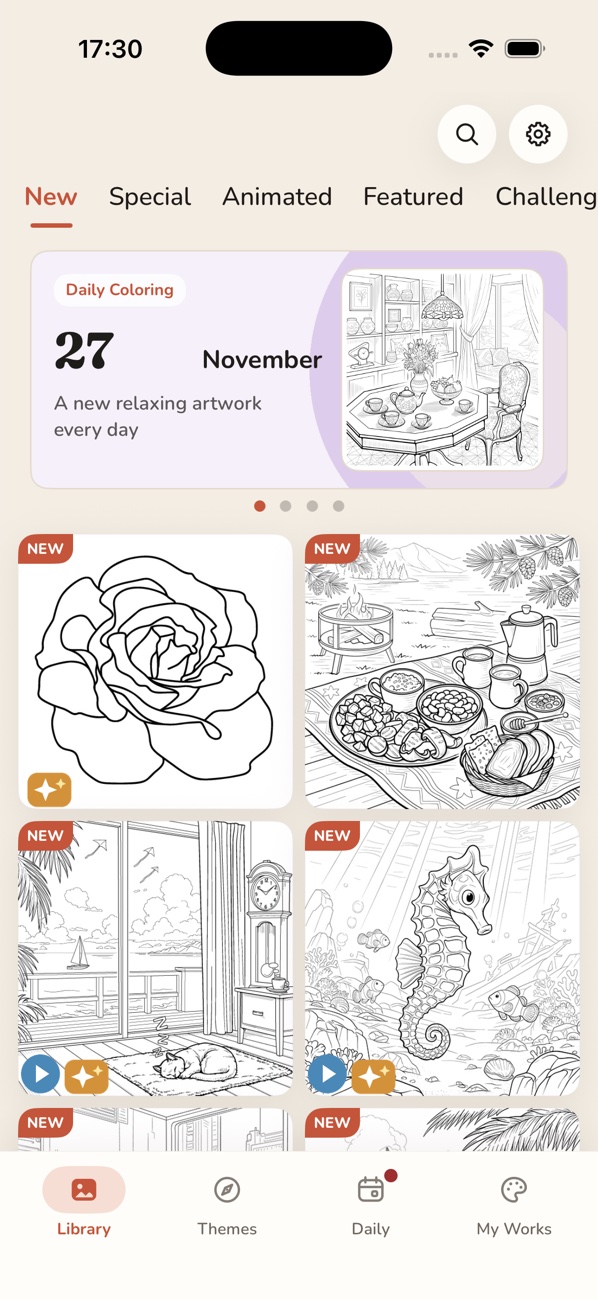
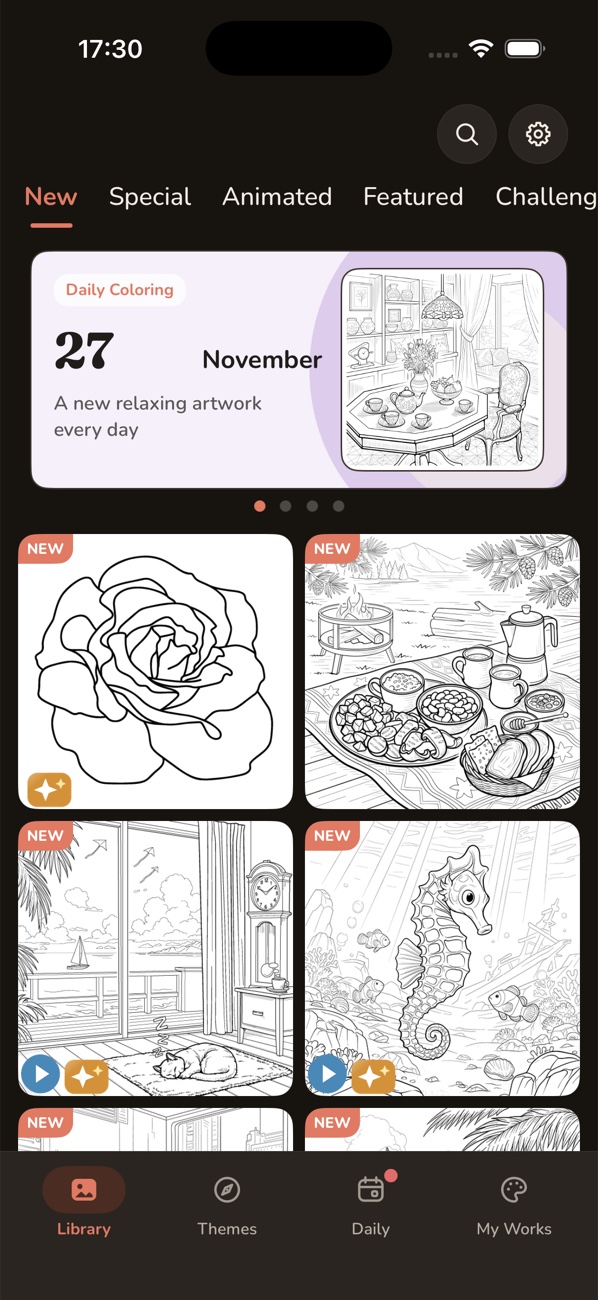
Hushue iOS app light mode gallery screen Hushue iOS app dark mode gallery screen
Hushue for iOS iOS 15.0+ · 12 Languages
Interactive Preview

Feel the rhythm right here.

Select a numbered studio pigment and tap the matching regions on the botanical flower below—just like Hushue on iPhone.

1 1 2 3 4 5 6 3 3 3 2 2
Atelier Palette 0 / 12 regions (0%)

Pick a numbered pigment below and tap the matching regions.

Crafted for Calm

Every detail tuned for unhurried focus.

Built natively in Swift and UIKit for fluid zooming, crisp vector linework, and tactile feedback without distractions.

Tactile Ink & Crisp Vector Art

Pinch deeply into fine details without pixelation. Soft ink-spread ripples, subtle audio notes, and gentle haptics make every tap deeply satisfying.

Smart Locate & Auto Color-Switch

Never hunt endlessly for a tiny region. Tap Hint to glide directly to the next spot, and let Auto Color-Switch advance seamlessly once a pigment finishes.

Daily Calendar & Missions

Discover a fresh featured illustration every day, catch up on past dates in the monthly calendar, and complete calm daily missions for bonus hints.

Curated Themes & 12 Milestones

Explore themed collections, collection challenges, mystery canvases, textured illustrations, and animated artworks alongside 12 multi-stage studio medals.

Still, Timelapse & Live Photo Exports

Watch your entire piece come alive stroke-by-stroke, preview lock-screen wallpapers, and save high-resolution images, timelapse videos, or Live Photos.

Zero Ads, Zero Tracking

No interstitial video ads, no IDFA, and no third-party ad networks. Color completely offline after download, with optional Sign in with Apple and instant deletion.

Inside the App

Designed like a warm paper sketchbook.

Explore real screens from Hushue across Studio Gallery, Curated Themes, Daily Calendar, Achievements, and Dark Mode.

Hushue Studio Gallery screen showing curated categories and artworks

A quiet art studio in your hand

Browse fresh artworks across botanical, animal, mandala, portrait, landscape, and specialty shelves—delivered cleanly with zero ad banners cluttering your canvas.

  • Dynamic categories & fast search across thousands of artworks
  • Special textured canvases, animated dynamic art & wallpapers
  • Hide completed pieces with one tap to stay focused on what is next
Privacy & Accessibility

Respects your peace, your family, and your privacy.

Hushue is crafted for global users of all ages—supporting native Dynamic Type, VoiceOver accessibility, Light & Dark appearances, and 12 handcrafted localizations.

English 简体中文 繁體中文 日本語 한국어 Español Français Deutsch Italiano Português Русский Türkçe
0
Third-Party Ad SDKs
0
Cross-App Trackers / IDFA
12
Native Languages
1-Tap
Full In-App Data Deletion
Questions

Frequently asked questions

Straightforward answers about Hushue, offline access, exports, and your privacy.

Is Hushue free to use? Are there ads?
Hushue is free to download and color, with zero third-party ad banners or pop-up video ads interrupting your artwork. You earn hints naturally through daily grants, daily missions, collection challenges, and achievements.
Do I need to create an account to start coloring?
No. You can open Hushue and start coloring immediately in guest mode. Your coloring progress, likes, hints, and preferences are saved locally on your device. Signing in with Apple is completely optional.
Is Hushue suitable for children and families?
Yes. Hushue is designed as a calm, all-ages art studio suitable for families. Guest coloring requires no personal data, includes no social chat, and contains no third-party advertising. Minors should use the app with a parent or guardian's guidance.
Can I color offline?
An internet connection is used to browse newly added artworks and download an illustration the first time. Once an artwork is opened and cached on your device, you can continue coloring it offline anytime.
What formats can I export when I finish a piece?
From the finish screen, you can save a high-resolution still image, export a stroke-by-stroke timelapse replay video, save an animated Live Photo (for dynamic artworks), preview a lock-screen wallpaper, or share collection and achievement cards.
How do I delete my account and local data?
Open Hushue → Settings → Delete Account & All Data and confirm the two-step prompt to permanently remove your server account (if signed in) and clear all local progress, tokens, and caches. See our Privacy Policy for full details.
Hushue App Icon

Bring calm color into your day.

Crafted natively for iPhone and iPad running iOS 15.0 or later. Questions, artwork inquiries, or support requests? We are always glad to hear from you.

Available for iOS · Requires iOS 15.0 or later · Support: [email protected]